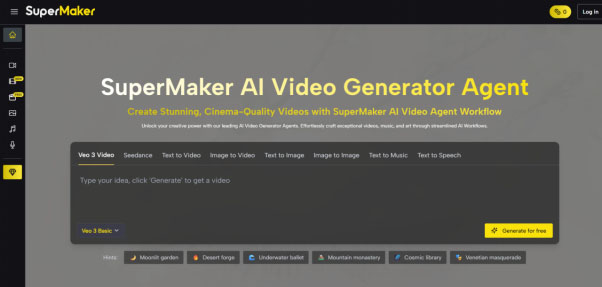
Most AI video tools solve one part of the problem — a clip generator, a voiceover tool, or a script assistant — and leave you stitching the rest together manually. AI Video Maker on SuperMaker AI is built differently: it connects Text-to-Video and Image-to-Video generation, AI-powered scriptwriting, storyboarding, multilingual voiceovers, and original music composition inside a single platform, with no download, no watermark, and a functional free tier that requires no credit card to start. For creators who need more than a one-click generator, it’s one of the most complete browser-based production environments currently available.
Who SuperMaker’s AI Video Maker Is Built For
The platform is designed for creators at the intersection of volume and quality — people who need consistent video output but can’t afford to spend days in a traditional editing suite:
- Marketers and brand teams who need multiple ad creative variations — product promos, campaign videos, social clips — produced quickly without briefing an agency or waiting on a design team
- Content creators and YouTuberswho want to turn scripts, article drafts, or rough ideas into polished video content and need tools that support iteration, not just a single generated output
- Educators and course developersconverting text-heavy lesson materials into narrated video sequences that hold learner attention without expensive production resources
- Social media managerswho must maintain a steady publishing cadence across TikTok, Instagram Reels, and YouTube Shorts while producing varied formats at speed
- Independent filmmakerswho want to develop scripts, visualize storyboards, and prototype scenes inside the same workspace before or instead of a live shoot
- Small business ownerswho need professional video content for launches or campaigns but have no in-house video production capability
Core Features of SuperMaker’s AI Video Maker
SuperMaker’s AI Video Maker brings together four distinct production capabilities that most platforms keep separate.
Multi-Model Text-to-Video and Image-to-Video Generation
The video engine gives you access to multiple specialized AI video models from one dashboard — including Veo (Google’s professional native audio model), Seedance (optimized for seamless transitions and natural scene flow), Wan AI (native audio-visual sync with HD output and motion control), Kling AI (high-quality video with native sound synthesis, multi-shot support, and end-frame control), and Grok — without needing separate accounts or subscriptions for each.
Each model carries distinct capabilities: Veo delivers professional-grade native audio integration; Seedance excels at smooth transitions between scenes; Wan AI handles audio-visual synchronization alongside precise motion direction; Kling AI supports complex multi-shot sequences with native sound synthesis and end-frame anchoring for consistent video continuity. Choosing the right model for your content type — rather than being locked into a single engine — is one of SuperMaker’s most practical production advantages.
Text-to-Video converts written scene descriptions into generated video sequences. Image-to-Video animates any still image from your assets library or upload into a dynamic clip. Both input modes are available across all supported models.
Storyboard Planning Before You Generate
Before generating a single frame, SuperMaker’s AI Storyboard tool lets you map out your video scene by scene — visualizing composition, pacing, and narrative flow in advance. This is a meaningful workflow advantage for anyone producing structured content like explainers, short films, or episodic series. Rather than generating blindly and iterating from poor outputs, you review and adjust the plan first, which reduces wasted credits and produces more consistent results. For teams, storyboards also function as shareable pre-production documents for client or stakeholder review.
Integrated Audio: AI Voice Maker and AI Music Maker
Every video generated on SuperMaker can be enhanced with two fully integrated audio tools — no third-party software required. AI Voice Maker converts your script into natural-sounding voiceover in multiple languages and voice styles, timed precisely to match your video’s pacing. AI Music Maker generates original royalty-free background music customized to mood, genre, and tempo — not stock tracks licensed from a library, but AI-composed original audio. Both tools sync automatically to your video timeline, meaning the full audio-visual production step happens without leaving the platform.
Assets Library with Cloud Storage and Version Tracking
Every video, image, audio file, and script you create on SuperMaker is automatically saved to a personal cloud-based assets library with version tracking. You can revisit previous outputs, reuse individual clips as reference inputs for new generations, or combine assets across multiple projects. For content teams running ongoing campaigns, this library functions as a lightweight production archive — eliminating the file management overhead that typically comes with high-volume video production.
How to Create a Video on SuperMaker
- Open supermaker.ai in your browser— no installation or credit card required; a free plan is available immediately on sign-up
- Plan your video— use the AI Scriptwriting tool to structure your narrative from a brief or concept, then map it visually using the AI Storyboard tool before generating any footage
- Select your input and model: — choose Text-to-Video and write your scene description, or Image-to-Video and upload a reference image; then select your preferred AI model (Veo, Seedance, Wan AI, Kling AI, or Grok) to match your quality and style requirements
- Generate and refine— click Generate and review your output; use the AI Chat interface to request adjustments conversationally — “make the camera movement slower,” “add more depth to the lighting” — and iterate without restarting from scratch
- Add audio — attach a voiceover via AI Voice Maker from your script text, and compose background music via AI Music Maker with your chosen mood and genre; both sync automatically to your video timeline
- Export and archive— download as MP4 for immediate distribution, or save everything to your assets library for reuse, remixing, or continued development across future projects
AI Video Maker Tools: How SuperMaker Compares
| Tool | Best For | Key Strength | Free Access |
| SuperMaker AI | Full production workflow: multi-model generation + storyboard + voice + music + asset library | Veo, Seedance, Wan AI, Kling AI, Grok in one platform; integrated audio suite; no watermark | Yes — free plan, no card required |
| Runway ML | AI generation + professional video editing | Advanced editing toolkit, strong inpainting | Limited free credits |
| Kling AI standalone | Realistic motion, image-to-video | Strong subject consistency across frames | Limited free tier |
| Canva Video | Template-based social video | Brand kit integration, ease of use | Yes (limited exports) |
The key distinction is workflow completeness. Where competing tools specialize in generation or editing alone, SuperMaker extends through scriptwriting, multi-model selection, storyboarding, integrated voice and music production, and organized asset management — all without leaving one platform.
FAQ
What is an AI Video Maker?
An AI Video Maker converts text descriptions or static images into video content automatically using machine learning models. SuperMaker’s AI Video Maker goes beyond generation by adding scriptwriting, storyboarding, multi-model selection (Veo, Seedance, Wan AI, Kling AI, Grok), AI voiceover, AI music composition, and a cloud assets library into a single connected workflow.
Is SuperMaker free to use?
Yes. SuperMaker offers a free plan with access to core Text-to-Video and Image-to-Video features, no download required, and no credit card needed to start. Higher usage limits, premium model access (including Seedance PRO and Kling AI PRO), and advanced features are available on paid plans.
Can I use videos I create on SuperMaker commercially?
According to SuperMaker’s published terms, videos created under paid subscription plans include full commercial usage rights for marketing, client deliverables, and monetized content. Reviewing the current terms of service directly is recommended for your specific use case.
What makes SuperMaker different from other AI video tools?
SuperMaker aggregates multiple leading video generation models — Veo, Seedance, Wan AI, Kling AI, and Grok — each with distinct audio and motion capabilities, alongside a complete audio suite (AI Voice Maker and AI Music Maker), integrated scriptwriting and storyboarding, and a versioned cloud assets library. Most competing tools offer one or two of these capabilities; SuperMaker is designed to support the full video production cycle from first idea to finished export.
Try SuperMaker AI Video Maker Today
Video production no longer requires a studio, a full editing suite, or a specialized team. SuperMaker combines the generation power of five industry-grade models with the planning, audio, and asset management tools needed to produce video consistently at scale. Whether you’re building a content calendar, launching a product, or prototyping a film concept, the platform covers the full workflow in one place. If you’re ready to replace your current video production bottleneck with something faster, more flexible, and free to start, visit supermaker.ai and try the AI Video Maker today.