


A visualisation pitch often promises one trick. The shopper drops your product into their own lounge, spins it, and feels ready to buy. That trick needs a model of the object and a room someone is allowed to measure. It is a configurator for a thing you already make.
A generated scene does not measure the floor. It invents the light, the setting, and sometimes a person beside the object. If you sell something you can pack and post, the page that takes the money still has to name that thing: what it is, what it costs, and whether you can send it this week. A scene can sit beside that page. It does not replace it, and it does not put the object in a house you have never entered.
The object you can actually send
Write the object the way you would say it across a counter. A woollen beanie, a jar, a chair from your bench. Add the price you will charge and the limit you can honour, such as how many you can post before the weekend. If a place is part of the offer, name a place you can stand in. A workshop is fair when the bench is there. A paddock is fair when the crop is this season’s.
Leave the buyer’s lounge out. Leave out a harvest you have not taken. Leave out a customer, a neighbour, or a face from a clip you saved. A generated figure belongs to the scene. That figure is not someone who shops with you, and they did not agree to be shown.
The pages below start after that description is true. None of them scans a floor. None of them is a three-dimensional spin of a sofa in a room the software has visited.
Where the scene gets planned
Topview is a workspace for the scene. You describe the idea, or you add a script, a reference video you have the right to use, or the address of your product page. It plans the shots, selects among the models it carries, generates the assets, and keeps each shot editable on the Canvas. A prompt, a link, an image, a video, or a mix of those can start the work. It can adapt a cut for short video feeds, ads, and stories.
Pasting the product address does not publish that page, and it does not copy the price or the stock into the picture for you. You still watch the result. A reference video is for pacing you are allowed to follow. It is not a licence to rebuild someone else’s advertisement. The workspace also does not decide that the scene matches the object in the box.
When the picture is a priced second at 1080p
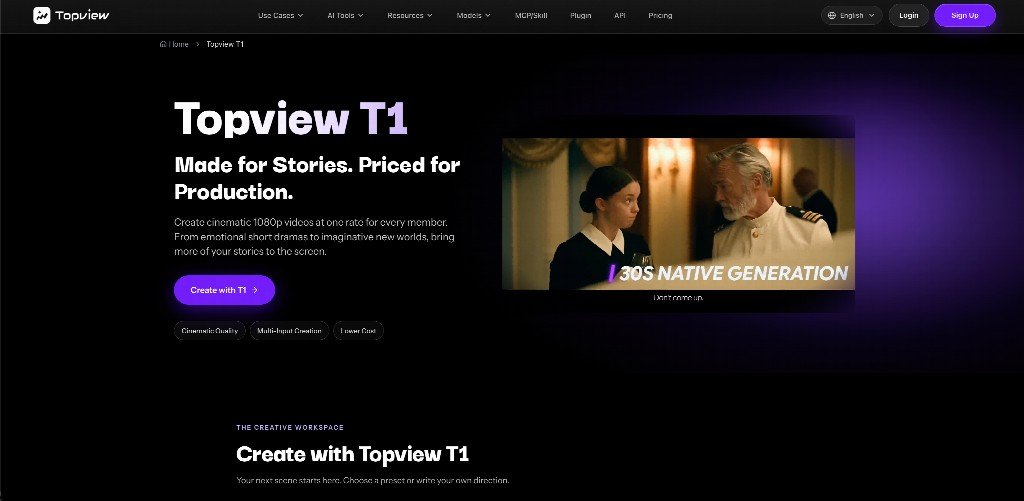
Topview T1 is the first video model Topview introduced. It generates the clip. Output is 720p or 1080p, and the credit price on the page is for 1080p. The page recommends 1080p for ordinary production.
Every member pays 2.2 credits a second at that size. The list price beside it is 2.75 credits a second. The rate does not rise with the plan, so another take is not held back for a higher tier. Thirty seconds at 1080p is listed at 6.60 US dollars. The same page lists 17.55 US dollars for thirty seconds at 1080p on Seedance 2.5, about 62 percent less, and says the difference is there for more shots. Ultra Annual members also receive 30 days of unlimited T1 generation.
A clip can run up to 30 seconds. You can start from text, from an image, or from a set of references. As many as 50 assets can mix image, video, and audio. Dialogue and subtitles can cross languages. The beginner setting on the page is 5 seconds, 1080p, a 16:9 frame, and no dialogue. Minutes you generate are not minutes left in the cut. Five tries can cost more than the one scene you keep. Commercial use follows the plan and the terms, and you need the right to every file you upload.
T1 does not enlarge an older soft file, and it does not paste one person’s face onto another. The samples show an animated short, a music-video performance, a night scene, a classroom, and a short challenge. They show the range the page is offering. They are not a score against another model, and they are not a photograph of your bench.
Use T1 when you already know you want 1080p, you want the credit rate in writing, and you want the next take at that same rate.
When the picture needs keyframes
Kling 4.0 is the next model in Kuaishou’s Kling family. Topview did not build it. Kling introduced it on 28 September 2026. On the Topview page, the generated buttons open the model in the Board. The same page still says an exact day for the full release has not been published, and that Kling 4.0 Flash is a separate option for Kling Ultra Yearly subscribers on Kling’s own plan. The buttons tell you whether a run will open. The lines marked coming soon tell you what that run does not yet include.
The specs card on the page, read against the announcement, says:
- A native clip runs about 3 to 30 seconds in one pass.
- Up to 10 keyframes can mark the moments that have to land.
- One task can carry up to 15 references: as many as 10 images, 5 videos whose combined length stays inside 30 seconds, and 7 subjects, with voice references for those subjects. The same kind of input can change part of an existing shot, or continue it.
- Ratios include 21:9, 16:9, 1:1, 9:16, or a smart frame.
- The announced picture ceiling is 4K, with stereo sound and lip sync. Languages named there include English, Chinese, Japanese, Korean, Spanish, Portuguese, German, French, and Hindi, along with accents such as American, British, and Indian English.
- Prompts on this page can run up to 8,000 tokens.
- The sample controls include a 720p setting and a 30-second duration.
10-bit HDR on 1080p and 4K is coming soon. Extension toward about two minutes is marked coming soon. Some sentences higher on the page speak of 4K HDR as though it were already the ordinary export, and the release-note examples include clips Kling labels as HDR. Those examples were made by Kling and published with the 28 September note. They are not a Topview export. Do not tell a buyer that every file you generate today is 4K HDR, or that the clip already runs two minutes. They are also not a test against T1. The page does not print a per-second price beside T1’s 6.60 US dollars.
The Kling page does describe a product spot: references used so a product, a figure, and a setting can be asked to stay consistent from one version to the next. That is a request you put in the prompt and the files. It is not a measurement of the buyer’s lounge, and it does not check the price on your page.
Use this model when you need those keyframes, that reference cap, and a frame the page actually lists, and when you can leave HDR and the two-minute extension for a later day.
What the buyer should be able to trust
The page they pay from carries the object, the price, and how many you can post. A scene beside it can show light and a setting you invented for that object. It cannot show their house, a paddock you did not walk this week, or a person who never agreed to stand there.
Start in the workspace when the product page is only the beginning and the shots still have to be editable. Use T1 when the 1080p second has a rate you can read before you run it. Use Kling 4.0 when the job is keyframes and the higher announced ceiling, after you have read the lines still marked later. The parcel is still the object. The scene does not pack it, and it does not change what you charge.