In today’s fast-paced digital world, music streaming has become an essential part of everyday life. Among the many platforms available, YouTube Music stands out with its massive library, personalized recommendations, and official music videos. However, one limitation remains: YouTube Music doesn’t offer a direct way to download songs as MP3 files for permanent offline use outside the app. If you’ve ever wished to save your favorite tracks as MP3 files to play on any device, you’re not alone.
This guide will walk you through why downloading YouTube Music to MP3 is useful, the challenges involved, and the most effective way to achieve it with the help of a powerful audio solution — ViWizard Streaming Audio Recorder.
Why Download YouTube Music to MP3?
Streaming is convenient, but it comes with restrictions. When you download music inside the YouTube Music app, the files are encrypted and can only be played within the app. Once your subscription expires or you lose internet access for a long period, those downloads become unavailable.
By converting YouTube Music to MP3, you gain:
- Permanent offline access to your favorite tracks
- Freedom to transfer music to any device, including MP3 players, USB drives, or car systems
- No app restrictions or subscription dependency
- Custom music libraries for DJ software or editing tools
In short, MP3 files offer flexibility that streaming platforms simply can’t match.
Can You Download YouTube Music as MP3 Directly?
Unfortunately, YouTube Music does not provide an official MP3 download option. Even premium subscribers can only download songs for in-app playback. This leaves many users searching for alternative ways to save YouTube Music tracks in common audio formats.
Online download websites may seem like a quick fix, but they often come with drawbacks:
- Unstable download speed
- Low audio quality
- Frequent link failures
- Potential security risks
For users who care about sound quality, safety, and batch downloading, a professional recording solution is a much more reliable choice.
The Smart Solution: Record YouTube Music in High Quality
Instead of attempting to extract or crack protected files, a smarter and safer approach is to download YouTube Music while it plays and save it as MP3. This method ensures high compatibility and avoids encryption limitations.
That’s where ViWizard Streaming Audio Recorder comes in.
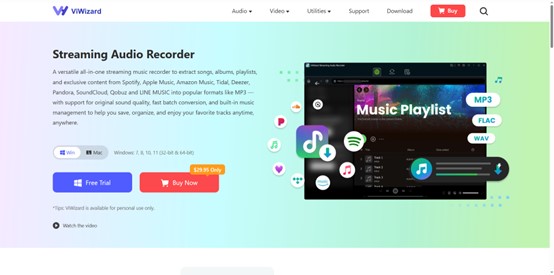
ViWizard Streaming Audio Recorder is designed to capture streaming audio from popular music platforms, including YouTube Music, and save tracks as standard audio files such as MP3, WAV, FLAC, or AIFF. It offers a simple yet powerful way to build your offline music collection without technical hassles.
- High-Quality Audio Output: ViWizard records YouTube Music with original sound quality preserved. You can choose MP3 format and adjust bitrate for optimal listening.
- ID3 Tag Retention: Song titles, artists, albums, and cover art can be saved automatically, keeping your music library organized.
- Multiple Format Support: Besides MP3, ViWizard supports WAV, FLAC, M4A, and more — giving you flexibility based on your device needs.
- User-Friendly Interface: No technical knowledge required. Just play, record, and save.
- Works with Popular Streaming Platforms: In addition to YouTube Music, ViWizard supports other streaming services, such as: Spotify, Tidal, Apple Music, Amazon Music, Deezer, making it a versatile audio recording tool.
Step-by-Step Guide: Downloading from YouTube Music to MP3
Ready to build your offline collection? Follow these simple steps with ViWizard:
Step 1: Download and Install
Visit the official ViWizard website to download and install Streaming Audio Recorder on your Windows or Mac computer. The installation process is straightforward and quick.
Step 2: Configure Your Audio Source
Launch ViWizard and navigate to the settings by going to the menu bar > preferences. Select MP3 as the output audio format. Then, you can adjust other audio parameters for YouTube Music such as bitrate, sample rate, and channel if needed.
Step 3: Choose YouTube Music and Add Desired Tracks to ViWizard
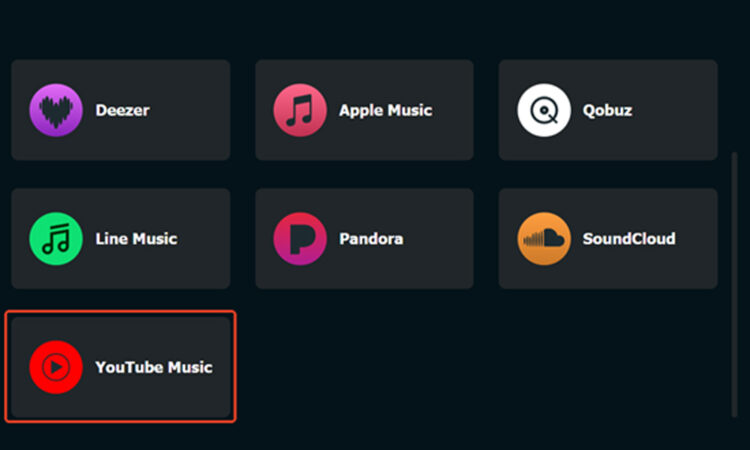
Return to the main ViWizard interface and select YouTube. Then, in the built-in web player, log in to your account and locate the desired songs. Open them and click the “+” button to import them into ViWizard.
Step 4: Start the YouTube Music Conversion
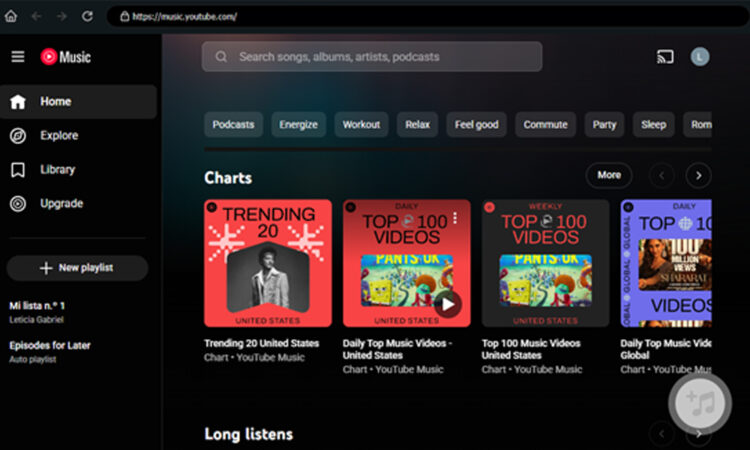
Go to the Converting panel and you will see all the imported tracks. You can rename the song and then click the Convert button located in the lower right corner to start the YouTube Music conversion.
Step 5: Save as MP3
After finishing the conversion, the software will present you with a list of the downloaded tracks. Here, you can edit ID3 tags (like song title, artist, album) for perfect organization. Now, click on the folder icon to locate the songs downloaded from YouTube Music on your computer. Then, you can enjoy your music library freely.
Why ViWizard is the Superior Choice
While other methods exist, ViWizard offers a combination of benefits that make it the professional’s choice for audio downloading:
Uncompromised Quality: Records audio at up to 320 kbps bitrate, capturing the full, rich sound of the original stream. You hear every detail.
Built-In Library Organizer: The software includes a dedicated music library to manage all your recorded songs, complete with editing and playback features.
Safe and Private: As a desktop software, it operates entirely on your computer. No need to upload private playlist links to unknown third-party websites.
Versatility: It’s not just for YouTube Music. Use it to record from Spotify, Apple Music, Amazon Music, and even podcast platforms.
Final Thoughts
Downloading YouTube Music to MP3 opens up a world of freedom for music lovers who want true ownership of their listening experience. While YouTube Music doesn’t provide native MP3 downloads, recording your favorite tracks is a reliable and practical workaround.
With ViWizard Streaming Audio Recorder, you get a smooth, high-quality, and user-friendly solution for capturing YouTube Music and saving it as MP3 files for offline enjoyment. No technical expertise required — just press play and let ViWizard handle the rest.
If you’re ready to take control of your music library and enjoy YouTube Music without limits, ViWizard Streaming Audio Recorder is the perfect tool to get started.