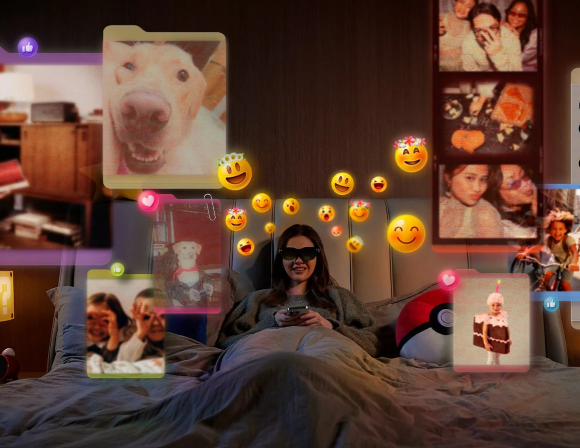
If you travel frequently, you know the specific misery of the “entertainment gap.” Phone screens are too small for immersion, while laptop screens feel awkward and cramped in economy seats.
This is the specific problem the RayNeo Air 3s AR Glasses are engineered to solve. They promise a massive screen experience that fits in your pocket, effectively ending the trade-off between portability and immersion.
But beyond the marketing hype of “201 inches,” how does this technology actually perform in the real world? We analyzed the optical physics and user experience to understand if this is the future of mobile display technology.
Visual Engineering: The 201-Inch Display Explained
To understand the appeal of the RayNeo Air 3s AR Glasses, you must first understand the optics. The glasses do not physically contain a 201-inch panel. Instead, they use HueView Micro-OLED panels that sit very close to your eyes.
Through a complex optical path, your brain perceives these images as a massive screen floating several meters in front of you. Many descriptions frame the 201-inch effect as a screen appearing roughly six meters away, while official guidance describes the viewing experience as comparable to watching a screen from about four meters away. It utilizes the same principle as holding a thumb up to block out the moon; proximity alters perceived scale.
The result is a Field of View (FOV) that mimics the sensation of sitting in the center row of a movie theater. Unlike VR headsets that close you off completely, these RayNeo Air 3s AR Glasses allow for peripheral awareness.
The Micro-OLED Advantage
The RayNeo Air 3s AR Glasses utilize Micro-OLED technology, a significant upgrade over standard LCDs. In a wearable display, contrast is not just a metric; it is the defining factor of immersion.
OLED pixels generate their own light. When a pixel is black, it is turned off completely. This creates “true black,” meaning the empty space around your movie frame is much darker, though ambient light can still influence perceived black levels.
This lack of “light bleed” means the video frame appears to float naturally. A contrast ratio of 200,000:1 ensures that colors pop vividly, a key feature when comparing the RayNeo Air 3s AR Glasses to older models.
120Hz Refresh Rate for Gaming
For cinephiles, 60Hz is sufficient. However, the RayNeo Air 3s AR Glasses are aggressively targeting the handheld gaming market. This includes owners of the Steam Deck, ROG Ally, and the Nintendo Switch.
In gaming, a 120Hz refresh rate means the screen updates 120 times per second. This reduces motion blur significantly, making fast-paced action games feel fluid and responsive.
When the screen is attached to your face, even micro-stutters become noticeable. The jump to 120Hz on the RayNeo Air 3s AR Glasses smooths out these imperfections, providing a stable visual anchor.
Fixing the Edge Blur
Previous iterations of consumer AR glasses suffered from a common optical flaw: edge blurring. Users often found that while the center was sharp, the corners were soft.
The RayNeo Air 3s AR Glasses have addressed this with an improved optical engine. Reviews suggest that edge-to-edge clarity is now consistent, allowing your eyes to scan the virtual screen naturally.
Physical Design and Daily Usability
Wearable tech lives or dies by weight distribution. The RayNeo Air 3s AR Glasses tip the scales at approximately 76 grams. While heavier than prescription frames, they are lighter than mixed-reality headsets.
This lightweight design is crucial for long flights. If the glasses slide down your nose even a millimeter, the top of the virtual screen can get cut off. The design prioritizes a locked-in fit to prevent this drift.
Real-World Ergonomics
To maintain comfort over long sessions, the RayNeo Air 3s AR Glasses feature several physical adjustments. These ensure the optical sweet spot aligns perfectly with your pupils.
Key ergonomic features include:
- Adjustable Temples: The arms articulate vertically to accommodate different ear positions and fit preferences.
- Customizable Nose Pads: These can be swapped or bent to change the height of the glasses on your face.
Audio Privacy and Eye Safety
Open-ear audio poses a privacy risk in quiet environments. The RayNeo Air 3s AR Glasses employ “Whisper Mode” utilizing acoustic phase cancellation technology.
This directs sound waves toward your ears while canceling out sound that would spill outward. It is designed to help minimize audio leakage in public spaces while keeping an open-ear listening style.
Furthermore, the RayNeo Air 3s AR Glasses implement 3840Hz hybrid dimming (DC + PWM). This high-frequency approach helps make flicker less perceivable at low brightness, reducing eye strain during marathon viewing sessions.
Connectivity and The Ecosystem
Unlike standalone headsets, the RayNeo Air 3s AR Glasses do not have an onboard battery. They act as a plug-and-play monitor, drawing power directly from the source device via USB-C, typically through DisplayPort video over USB-C.
This tethered approach reduces weight and eliminates “battery anxiety” for the glasses themselves. If your phone or console has power, your RayNeo Air 3s AR Glasses work.
Compatibility covers a massive range of modern electronics:
- Smartphones: iPhone 15/16 series and Android phones that support DisplayPort video over USB-C can drive the RayNeo Air 3s AR Glasses, while older iPhones generally require an adapter for video output.
- Handheld PCs: Steam Deck, Lenovo Legion Go, and Asus ROG Ally work seamlessly.
The Nintendo Switch does not output USB-C video directly, so it typically needs an adapter. RayNeo addresses this with the “JoyDock” accessory, effectively turning a 7-inch handheld experience into a 1080p home theater.
Market Analysis: Finding the Best AR Glasses
The market for XR eyewear is crowded, with competitors vying for the top spot. However, many alternatives suffer from dimmer screens or unnatural color saturation.
When you analyze price-to-performance, the RayNeo Air 3s AR Glasses carve out a unique niche. They avoid the bulk of spatial computers while offering superior visual fidelity to budget viewers.
For users seeking a pure display extension, these are arguably the best AR glasses currently available in the sub-$400 category. They focus on doing one thing—displaying content—extremely well.
Journalistic integrity requires us to highlight limitations. The screen is “3DoF,” meaning it can track rotational head movement but does not provide 6DoF spatial anchoring. It does not stay anchored in space like a physical TV.
While software solutions exist, the native hardware experience is a fixed heads-up display. This makes the RayNeo Air 3s AR Glasses ideal for video but potentially disorienting for walking.
Verdict: The Ultimate Travel Companion?
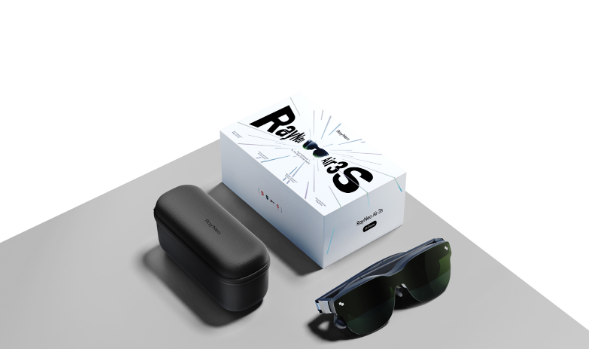
The RayNeo Air 3s AR Glasses represent a maturity in the display market. They have moved past the prototype phase into a polished consumer product.
By fixing the edge blur and enhancing the refresh rate, RayNeo has created a compelling argument for ditching physical screens. The RayNeo Air 3s AR Glasses solve genuine pain points for travellers.
If you are looking for the best AR glasses for pure entertainment, the combination of Micro-OLED visuals and lightweight design makes this a standout choice. It brings the IMAX experience to your backpack.